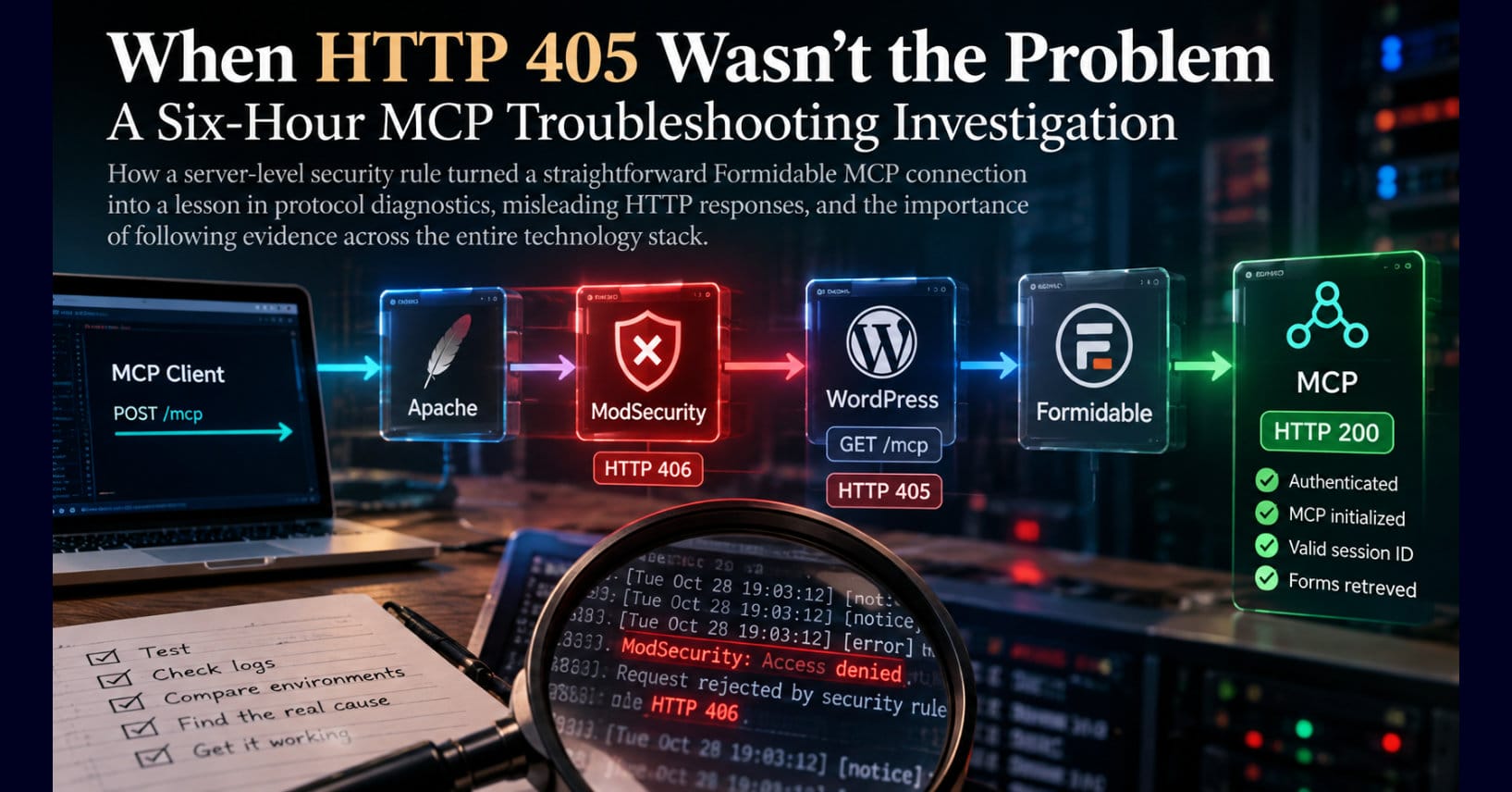
How a server-level security rule turned a straightforward Formidable MCP connection into a lesson in protocol diagnostics, misleading HTTP responses, and the importance of following evidence across the entire technology stack.
Summary
What began as a straightforward effort to connect OpenAI Codex to a production WordPress application became a nearly six-hour investigation into a misleading HTTP 405 error. Although authentication succeeded, MCP initialization consistently failed.
Through systematic testing across multiple WordPress installations, custom diagnostic instrumentation, and Apache log analysis, the investigation uncovered a ModSecurity rule rejecting legitimate client requests. The resulting error-handling behavior obscured the original failure.
This technical case study examines the troubleshooting process, the importance of distinguishing symptoms from root causes, and the architectural lessons for enterprise developers integrating AI agents with production systems.
The Assignment Was Simple. The Connection Was Not.
I began the afternoon of October 28, 2026, with what should have been a relatively straightforward development task. I wanted to inspect an existing cybersecurity governance self-assessment application built with Formidable Forms before designing a corresponding AI governance assessment.
The existing application runs on the Cyber Governance Center (CGC) website. It uses Formidable Forms to collect assessment responses, evaluate governance conditions, and produce structured results. Rather than manually inspecting the application’s forms, fields, and configuration through the WordPress administrative interface, I intended to use OpenAI Codex through Formidable’s Model Context Protocol (MCP) integration.
The objective was simple: establish a connection, inspect the existing application, understand its data structures, and use that information to inform the next application. Instead, I spent the next five hours and forty-six minutes investigating why the production MCP connection would not initialize. By 8:10 p.m., the connection was working, and the problem had nothing to do with the Formidable application, its database, its credentials, or even the MCP implementation itself. The culprit was a server-level security rule that blocked the client before the MCP protocol could complete its initialization.
What made this investigation particularly instructive was not simply the root cause. It was the number of technically accurate but operationally misleading signals encountered along the way. The server reported HTTP 405, WordPress reported successful authentication, Formidable recognized the connecting client, and Apache confirmed that the client submitted POST requests. Yet the application received GET requests, and the MCP handshake never completed. Every one of those observations was real. Understanding how they could coexist was the challenge.
Understanding the Architecture
Before examining the failure, it is worth understanding the architecture involved. The Model Context Protocol provides a standardized mechanism through which AI clients can communicate with external applications and services. In this case, Codex was the AI development environment, and Formidable MCP exposed capabilities within WordPress.
The connection involved several components operating together:
- Codex: The AI development environment initiating the request.
- MCP helper: The client-side component responsible for establishing the connection.
- Apache: The web server receiving the HTTP request.
- ModSecurity: The web application firewall inspecting requests against configured security rules.
- PHP and WordPress: The application runtime processing requests.
- WordPress application passwords: The authentication mechanism authorizing the connection.
- Formidable MCP: The application-level service implementing the MCP interface.
For the connection to succeed, each component had to perform its responsibility correctly. A successful HTTP connection was not enough, nor was successful authentication or even reaching the Formidable MCP application. The client and server needed to complete the MCP initialization sequence, establish the required session context, and exchange valid protocol messages. That distinction became central to the investigation.
The First Problems Were Ordinary Configuration Errors
The investigation began with two relatively routine issues. The original connection configuration included /public_html/ in the public URL. That directory name belonged to the server’s filesystem structure, not the website’s public URL structure. Consequently, the initial request returned HTTP 404.
Correcting the endpoint exposed a second problem: the Formidable MCP server was disabled. After enabling the service, I updated the installation to the current Formidable MCP plugin and downloaded a fresh connection configuration. At that point, the obvious configuration issues had been resolved, and the connection should have worked.
Instead, the production server consistently returned HTTP 405 Method Not Allowed, an empty response body, and no MCP session identifier. The absence of a session identifier was particularly important because it indicated that the connection was not merely failing to retrieve application data. It was failing during protocol initialization, directing the investigation toward the HTTP transport and the components responsible for processing the initial request.
Authentication Was Successful. The Connection Was Not.
One of the first misleading indicators came from Wordfence. Its activity records showed “App Password Accepted,”indicating that WordPress application-password authentication had succeeded. Formidable also displayed the names of the connecting MCP clients, which initially appeared encouraging.
However, Formidable’s Recent Requests column remained empty. This created an interesting diagnostic contradiction: the application recognized the connecting client, but there was no evidence that the client had completed a useful MCP exchange.
The distinction matters because authentication and protocol initialization answer different questions. Authentication establishes whether a client is presenting credentials the application accepts. Protocol initialization establishes whether that authenticated client can negotiate a valid communication session with the service. A system can answer yes to the first question and no to the second, which is precisely what happened here.
For developers integrating AI agents with enterprise applications, this distinction deserves particular attention. An authentication success message is not an end-to-end integration test. It confirms that one security checkpoint has been satisfied, not that the entire communication path is operational.
Localhost Became the Control Environment
The next step was to determine whether the failure originated in the client tooling or the production environment. I had a local WordPress development environment available, so we used the same updated MCP helper to establish a connection to localhost. The client authenticated successfully and retrieved a list of 41 Formidable forms.
That result was significant because it demonstrated that the updated helper could successfully negotiate an MCP connection and retrieve application data in a working environment. It did not prove that every aspect of the helper was universally correct, but it substantially narrowed the investigation.
We now had two environments producing different results. Local development supported successful authentication, MCP initialization, and form retrieval. Production showed successful authentication indicators but returned HTTP 405 without establishing an MCP session.
The investigation therefore shifted toward environmental differences. This is a familiar pattern in enterprise software engineering: when identical or substantially equivalent application components behave differently across environments, the infrastructure surrounding those components becomes a primary investigative target. Unfortunately, identifying the correct layer is not the same as identifying the correct failure.
Instrumenting WordPress to Find the Missing Request
At this point, relying on administrative interfaces and ordinary application logs was insufficient. We needed to observe what WordPress was actually receiving, so I created a temporary WordPress must-use plugin to instrument the request lifecycle.
A must-use plugin was appropriate because it loads automatically during WordPress initialization, allowing diagnostic code to execute before many ordinary application components. The initial instrumentation attempted to record request information through standard WordPress debugging facilities, but those attempts produced no usable diagnostic records.
Rather than assume the plugin was not executing, we expanded the instrumentation. Successive versions introduced dedicated diagnostic logging and custom HTTP response headers. The response headers were especially useful because they provided observable evidence that the diagnostic plugin had loaded, even when conventional logging was inconclusive.
Eventually, we established that the plugin was executing and could capture the request early in WordPress startup. That revealed the most puzzling observation of the investigation: the client was sending POST, but PHP and WordPress were receiving GET.
This was not speculation. The client-side request used POST, and Apache’s access log independently recorded the original request as POST. Yet the request information visible to PHP identified the method as GET, which Formidable MCP rejected with HTTP 405.
The HTTP 405 response was therefore technically consistent with the method reaching the application, but it did not explain why the original POST had become a GET. We had discovered a symptom, not its cause.
The Danger of Treating the Final Error as the Original Failure
HTTP 405 means that the requested resource does not support the HTTP method being used. If a developer encounters that response while implementing an MCP client, the natural assumption is that the client submitted an unsupported method. That assumption would have been incorrect in this case because the original request was a POST, while the application ultimately received a GET.
Something happened between those observations, illustrating a broader principle of distributed-system diagnostics: the final error returned to a client is not necessarily the error that initiated the failure.
Requests can encounter multiple processing layers. A reverse proxy, web application firewall, redirect, error handler, web server configuration, or application router may alter the path taken by a request. Consequently, the final response may describe the behavior of a secondary request rather than the original transaction.
Our evidence strongly suggested that an earlier failure triggered subsequent error handling that resulted in the GET observed by WordPress. However, we had not yet identified that earlier failure, nor had we traced every internal step responsible for the method change. The next task was to determine what happened before PHP received the request.
Eliminating Plausible Causes
Several components could reasonably have contributed to the behavior, so we systematically tested them. First, we resaved WordPress permalinks to refresh rewrite configuration, but that produced no change. Next, we temporarily deactivated Wordfence, which also failed to resolve the problem. This was important because Wordfence had been recording authentication activity, making a WordPress-level security plugin an obvious suspect.
We also disconnected a WebPros integration and examined the possibility that server-management tooling was influencing request processing. Again, there was no improvement. Additional investigation included inspecting .htaccess, PHP configuration, document-root settings, and Apache security includes associated with WP Toolkit. We even rebooted the server.
None of these actions resolved the problem or established a supported root cause. The investigation was becoming time-consuming, but it was also producing useful negative evidence. Each unsuccessful test helped eliminate or reduce confidence in a hypothesis.
The important discipline was not to confuse a plausible explanation with a demonstrated one. A configuration component could look suspicious without being responsible, a security plugin could record the request without being the component that blocked it, and a reboot could change the runtime state without addressing the underlying configuration. The objective was not to make the error disappear through random changes. It was to explain the failure.
A Second Production Website Changed the Investigation
The next major breakthrough came from testing another website on the same server. FontLife Publications had previously supported a working Formidable MCP connection, making it a valuable comparison.
If CGC alone failed, the investigation might reasonably remain focused on its WordPress configuration, plugin installation, or site-specific settings. But FontLife Publications now exhibited the same HTTP 405 behavior, changing the scope of the problem considerably.
Two independent WordPress installations were failing in the same way, and both shared the same underlying server infrastructure. The hypothesis that two unrelated Formidable configuration failures were producing identical symptoms became less persuasive, while the possibility of a shared infrastructure problem became substantially stronger.
The investigation moved further away from WordPress and toward Apache and its request-processing pipeline.
When Even a Static Text File Cannot Be Retrieved
To isolate WordPress from the equation, we created temporary diagnostic resources, including a standalone PHP probe and a static text file. The reasoning was straightforward: a static text file should not require WordPress, Formidable, application-password authentication, or MCP. If the server could not deliver that file correctly, the problem likely existed outside the application.
The results were unexpected. Requests to the temporary PHP and text files reached WordPress’s 404 page instead of returning the expected resources. Initially, that appeared to implicate document-root configuration, rewrite rules, or request routing. Those were reasonable possibilities, but the probes were themselves subject to the same security behavior affecting the MCP requests.
The later evidence showed that the security rule blocked those diagnostic requests as well. In other words, our attempt to isolate the failure was being intercepted by the failure mechanism itself.
This is an important diagnostic trap. A test is useful only when its assumptions are valid. If a security control blocks both the application request and the diagnostic probe, the probe may reinforce an incorrect hypothesis. We had to look earlier in the request-processing chain.
The Evidence Was in Apache’s Error Log
The Apache error log finally revealed the source of the failure. A ModSecurity rule within the server’s security configuration, managed through EasyApache 4 in WHM, was rejecting the MCP requests based on characteristics of the HTTP client. The rule operated at the web server layer, independently of WordPress, Formidable, and the MCP authentication mechanism.
This discovery explained why two separate production WordPress installations exhibited identical failures and why our standalone diagnostic probes were also affected. Both websites shared the same underlying server infrastructure, and the security rule was intercepting requests before they could complete their intended processing. The problem originated in a shared infrastructure control rather than either application’s configuration.
The previously contradictory observations now began to make sense. The MCP client submitted POST requests, and Apache’s access log confirmed their arrival. However, ModSecurity denied the original requests with HTTP 406. Subsequent request processing resulted in WordPress receiving GET requests, which Formidable MCP rejected with HTTP 405. The client ultimately received that secondary error without obtaining a valid MCP session identifier.
Although the evidence strongly supported an error-handling sequence that produced the unexpected GET requests, we did not independently trace every internal transition. That distinction matters because the ModSecurity denial was a confirmed finding, while the precise mechanism responsible for the method change remained an inference. Nevertheless, the original security rejection was explicitly documented in Apache’s error log, providing the evidence needed to isolate and validate the root cause.
The Resolution Was in the Client Configuration
The Apache error log finally established that a server-level ModSecurity rule was rejecting requests based on characteristics of the HTTP client. The rule was operating independently of WordPress, Formidable, and the MCP authentication mechanism.
The investigation demonstrated that the MCP helper’s default client identification was triggering the security policy. Rather than disable ModSecurity, weaken authentication requirements, or introduce a broad security exception, we adjusted the helper’s client configuration to identify the integration appropriately.
The result was immediate. The server returned HTTP 200, the MCP initialization completed successfully, and the client received a valid session identifier. Subsequent read-only operations retrieved eight forms from Cyber Governance Center and fourteen from FontLife Publications.
Importantly, the resolution did not circumvent WordPress authentication or grant additional application privileges. The client still needed valid credentials and remained subject to the application’s existing authorization controls. The adjustment resolved an unintended conflict between a legitimate integration and an infrastructure security rule.
We made no changes to the existing forms, application passwords, or server security policies. The correction was limited to the client configuration, preserving the security controls already protecting the production environment.
The experience illustrates an important distinction between security enforcement and security effectiveness. A web application firewall can correctly enforce a configured rule while inadvertently blocking legitimate application traffic. Resolving that conflict requires understanding the rule’s purpose, validating the requesting application, and making a narrowly scoped correction without unnecessarily weakening the overall security posture.
Why the Investigation Took Nearly Six Hours
The elapsed investigation ran from approximately 2:24 p.m. to 8:10 p.m. Eastern, representing five hours and forty-six minutes. That was not continuous keyboard activity. The elapsed time included testing, reviewing logs, exchanging diagnostic results with Codex, modifying temporary instrumentation, changing configurations, and rebooting the server.
Nevertheless, the investigation illustrates why apparently simple integration failures can become expensive. The problem crossed multiple architectural boundaries, with each layer presenting a different observation. At the client layer, the request appeared valid. At the authentication layer, credentials were accepted. At the application layer, the request method appeared invalid. At the web server layer, the original request method was correct. At the security layer, the request was being denied before the application could complete the intended transaction.
No single observation explained the entire failure. The answer emerged only after correlating evidence from multiple layers.
Codex was valuable throughout the process because it helped formulate hypotheses, generate diagnostic instrumentation, interpret observations, and propose subsequent tests. However, AI assistance did not eliminate the need for engineering judgment. In fact, the investigation reinforced the importance of that judgment.
An AI assistant can generate a plausible explanation very quickly, but it can also generate several plausible explanations that turn out to be wrong. The responsibility of the engineer is to distinguish hypotheses from evidence and prevent the investigation from becoming an endless sequence of configuration changes.
The breakthrough did not come from producing more code. It came from locating the authoritative evidence of the original denial.
Five Lessons for Enterprise Developers
1. Authentication Success Is Not Integration Success
WordPress accepted the application password, and Formidable recognized the client. Neither observation demonstrated that MCP initialization had succeeded.
Enterprise integrations require verification at the protocol and application-operation levels. For MCP, that means confirming successful initialization and then executing an authorized operation. A credential acceptance message is only one checkpoint in a much larger transaction.
2. HTTP Status Codes Must Be Interpreted in Context
HTTP 405 was the response received by the client, but it was not the original failure. The earlier ModSecurity denial was recorded as HTTP 406.
Developers should resist treating the final status code as a complete explanation of the request lifecycle. When client-side and server-side observations conflict, intermediate infrastructure deserves investigation. The original failure may have occurred before the component producing the visible error was even involved.
3. Shared Failures Suggest Shared Dependencies
Testing FontLife Publications changed the investigation because two websites with the same failure pointed toward their shared infrastructure.
This principle applies far beyond WordPress. When independent applications fail simultaneously, investigate common dependencies such as proxies, firewalls, identity providers, DNS, certificates, network policies, and hosting infrastructure. The failure domain is often more informative than the error message.
4. Diagnostic Tools Can Be Affected by the Same Failure
Our standalone PHP and static-file probes were blocked by the same security rule. Their unexpected behavior initially suggested additional configuration problems.
A diagnostic probe is not automatically independent simply because it bypasses application code. Its transport, headers, network path, and security controls still matter. Good diagnostics require understanding what the test actually isolates and recognizing when the test itself may be subject to the suspected failure mechanism.
5. Security Controls Need Observable, Explainable Outcomes
ModSecurity was enforcing a configured rule. From the firewall’s perspective, the request matched a prohibited pattern. The operational problem was that the denial was not apparent in the final response observed by the MCP client.
The application-level error obscured the infrastructure-level cause, demonstrating why security observability matters. An effective security control should not only enforce policy; its decisions should also be traceable by authorized administrators. Otherwise, a legitimate integration failure can consume hours of engineering effort while the decisive evidence remains buried in a server log.
The Broader Lesson for AI-Enabled Enterprise Architecture
There is a larger architectural issue here. As AI agents become integrated with operational systems, MCP connections and similar interfaces will increasingly become part of enterprise application infrastructure. These integrations will traverse authentication services, application gateways, security controls, protocol adapters, and business applications.
Each layer introduces another opportunity for a technically valid request to fail. More importantly, each layer may report a different interpretation of the same transaction, creating a governance and observability challenge.
If an AI agent cannot complete an authorized operation, can the organization determine why? Can it distinguish an authentication failure from a protocol failure, identify a security-policy denial, correlate the original request with subsequent application errors, and demonstrate that a failed operation did not modify business data?
These questions become particularly important when agents move beyond read-only inspection and begin executing business workflows. An agent that cannot connect is inconvenient. An agent that encounters ambiguous failures while executing consequential operations presents a much more serious operational risk.
The solution is not simply better error messages. It is an architecture that preserves sufficient evidence across the request lifecycle to explain what happened. That includes consistent request correlation, meaningful security logs, explicit authorization decisions, protocol-level diagnostics, and observable application outcomes.
For enterprise developers, these capabilities should be considered design requirements rather than optional troubleshooting conveniences. As AI-driven integrations become more deeply embedded in operational systems, the ability to reconstruct and explain system behavior will become increasingly important to reliability, accountability, and governance.
There is a larger governance lesson here, too. A User-Agent is a client-controlled identifier, not a trustworthy security credential. Security rules that depend on such identifiers can be useful for filtering unwanted traffic, but they should never substitute for authentication, authorization, or other substantive security controls.
What Happens Next
The immediate objective was achieved. Codex successfully initialized the production Formidable MCP connection and retrieved form inventories from both Cyber Governance Center and FontLife Publications. The successful test required no changes to the existing forms, credentials, or server security rules.
The User-Agent adjustment was applied when invoking the helper. That resolves the immediate operational issue, but it is not necessarily the final configuration decision.
A permanent helper configuration could establish a stable, descriptive User-Agent. Alternatively, a narrowly scoped server-side exception could be evaluated if future legitimate clients encounter the same restriction. Any such exception should preserve the security control’s intended protections rather than broadly disabling request inspection.
The temporary diagnostic instrumentation should also be removed once its purpose has been fulfilled. The original development assignment—inspecting the cybersecurity governance assessment before designing its AI governance counterpart—can now proceed.
However, the investigation produced something more valuable than a working connection. It demonstrated how easily developers can be misdirected when infrastructure failures are transformed into application-level symptoms.
Final Thoughts: Follow the Request, Not Just the Error
The most important lesson from this investigation is straightforward: successful authentication does not prove successful protocol initialization, and the final HTTP response may conceal an earlier failure.
We began with an HTTP 405 error that appeared to implicate the MCP client or Formidable’s handling of HTTP methods. We eventually discovered an HTTP 406 denial originating in a server-level ModSecurity rule.
The difference mattered. Had we continued modifying WordPress, Formidable, or the MCP helper’s protocol behavior without examining Apache’s security logs, we might never have identified the actual cause.
Instead, the investigation succeeded by correlating evidence across the entire request path: the client request, Apache access log, early WordPress diagnostics, Apache error log, and a controlled retest. That sequence transformed an ambiguous integration failure into a demonstrable root cause.
The final solution was remarkably small. After nearly six hours of elapsed troubleshooting, the connection worked because we changed the client’s User-Agent.
Sometimes the hardest part of enterprise software engineering is not writing the code. It is discovering which component is actually refusing to let the code run.