"A cloud does not know why it moves in just such a direction and at such a speed...It feels an impulsion...this is the place to go now. But the sky knows the reasons and the patterns behind all clouds, and you will know, too, when you lift yourself high enough to see beyond horizons.â âRichard Bach, author of âJonathan Livingston Seagull.â
Little did I know that when it was time to upgrade my cell phone, that it would lead to an exciting new adventure navigating the world of cloud computing. How I used to dream of a seamless integration between the calendar on my cell phone and Outlook. Over the years, Iâve tried Palm Pilots, Windows Mobile phones, Blackberries and many more. The problem with all of these legacy technological wonders is that they all relied on synchronization software to make them work. Sometimes the software worked well, more often than not, it didnât. With the lone exception of the Blackberry, they also required you to be connected to your computer with a sync cable. And if your company didnât have a Blackberry server, you would either have to sync through Blackberryâs service requiring additional software on your computer or through a sync cable.
Itâs different today. I just got a Droid X. It runs Googleâs Android operating system. Out of the box, the supplied calendar application automatically synchronizes with your Google account calendar. No muss. No fuss. It just works! And it uses the cloud to do so. It was so easy to set up, I had a hard time accepting its simplicity.
The next step was to look for a way to synchronize the Droid X with Outlook 2010 on Windows 7 x64. The Google Sync application only works on Windows x86. Search as I might, I couldnât find a free application that allows Outlook 2010 to easily sync with my Droid X and Google calendar. I did find some applications that you could buy, but since I got laid off in December, Iâm all for doing things on the cheap these days. Once again, I turned to the cloud. I started thinking about the different calendar formats Outlook supports and checked to see if Google supports the same formats.
Sure enough, both support the .ics or iCalendar format. iCalendar is a file format that allows Internet users to send meeting requests and tasks to other Internet users via email, or the sharing files with an extension of .ics. iCalendar is used and supported by a large number of products, including Google Calendar, IBM Lotus Notes and also partially by Microsoft Outlook.
Setting up Google calendar to synchronize with Outlook is extremely easy. Here is a simple tutorial to get you going:
- Go to the Outlook Calendar and click the Open Calendar icon on the ribbon bar.
- Select âFrom Internetâ
Â
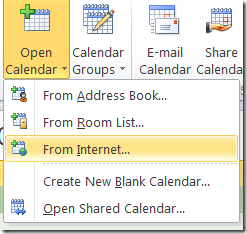
- The next dialog box asks you to enter the URL of the Internet Calendar. Finding the URL to enter into this dialog is the hardest part.

- Go to your Google calendar in your browser. On the top right hand side of the screen select the Settings menu, then Calendar settings.

- Select the Calendars tab and click on the calendar with which you want to synchronize. In my example, itâs the one with my email address.

- This brings you to the calendar detail page. Look at the bottom of the page on the left side. See the heading for Private Address:? Click on the ICAL icon. This displays the URL you copy and paste into the dialog box in Step 3.


Now I can enter a new calendar appointment on my laptop in Outlook, on the internet through Google or on my Droid X. No matter where I make the entry, all three systems are updated automatically. Well, let me qualify that a little. Google and the Droid X integrate seamlessly. There are no extra steps to perform for them to synchronize. For Outlook, you have to do a send/receive to sync with Google.
When it comes to cloud computing, I mirror Richard Bachâs sentiment, âIt feels an impulsion...this is the place to go now.â Youâll have to agree too âwhen you lift yourself high enough to see beyond horizons.â
