Introduction
You may be asking yourself, "What is modernizing a WordPress database?", "Why would I modernize a WordPress database?", or "What benefit is there to modernizing my WordPress database? "
You're not alone. In fact, we never thought to even ask ourselves these questions until we encountered the error below filling up a client's php_error.log. Ultimately, this error means a WordPress database query failed to execute with a fatal error:
WordPress database error Illegal mix of collations (latin1_swedish_ci,IMPLICIT) and (utf8mb4_unicode_520_ci,COERCIBLE) for operation 'like' for query Impromptu Survey
Before you continue reading, would you mind taking this 1-question impromptu anonymous survey?
If you viewed the survey, we choose the second option! Our minds flooded with questions:
- What is an "Illegal mix of collations"?
- Why does one of our WordPress tables have the latin1_swedish_ci collation? Isn't the WordPress default character set in wp-config "utf8"?
- Why is the other table's collation utf8mb4_unicode_520_ci? Isn't the WordPress standard utf8_general_ci?
- Why are the collations different? Doesn't WordPress control character set and collation in wp-config?
Whatever the answers are, we know our WordPress database just failed to execute a query and it doesn't appear to be the plugin's fault. It's a problem with the WordPress database itself and the core WordPress tables. This error deserves a "priority one" rapid response, but how do we start to understand what the problem really means?
Unless a web developer has a smidgen of database administrator experience with MySQL and MariaDB, and the fearlessness to match that's coupled with an understanding of character sets and collations, the answers to these questions may be foreign and a little self-education is time well spent.
Perhaps we should start by researching "What is a collation?", "What is a character set?", "What do they do?", "How do they relate to each other", and "How do I fix this fatal WordPress database error?".
Since the utf8mb4_unicode_520_ci is involved in this error, for clues to this conundrum let's begin with the Unicode Consortium and see what they have to say about the topics.
Unicode Consortium
A character set is a set of characters while a collation is the rules for comparing and sorting a particular character set.
https://mariadb.com/kb/en/character-set-and-collation-overview/
Unicode establishes the foundational layers that make it possible to design code that handles the requirements of all languages and regions at the same time, while minimizing the need for lower-level details and idiosyncrasies to interfere with that design.
The Unicode Consortium is the premier standards organization for internationalization of software and services, including the encoding of text for all modern computing systems. The Unicode Consortium began as the standards body for character encoding and derives its name from three main goals:
- universal (addressing the needs of world languages)
- uniform (fixed-width codes for efficient access), and
- unique (bit sequence has only one interpretation into character codes)
Since that time, it has expanded to be far more than character encoding. Its work now includes the character properties and algorithms, language and locale data for internationalization, and production software libraries to make everything accessible to programs.
Character Encoding Explained
The Unicode Consortium explains character encoding this way:
In general, computers just deal with numbers. They store letters and other characters by assigning a number for each one. Before the Unicode standard was developed, there were many different systems, called character encodings, for assigning these numbers. These earlier character encodings were limited and did not cover characters for all the worldâs languages. Even for a single language like English, no single encoding covered all the letters, punctuation, and technical symbols in common use. Pictographic languages, such as Japanese, were a challenge to support with these earlier encoding standards.
Early character encodings also conflicted with one another. That is, two encodings could use the same number for two different characters, or use different numbers for the same character. Any given computer might have to support many different encodings. However, when data is passed between computers and different encodings it increased the risk of data corruption or errors
Character encodings existed for a handful of "large" languages. But many languages lacked character support altogether.
Investigation
Investigating this issue starts with an examination of the database structure. This is a PHPMyAdmin screen capture image of the database structure that produces the "Illegal mix of collations" error.

If your database looks anything like the above image showing a variety of storage engines and database collations, chances are you have a very old WordPress installation. The WordPress database has evolved quite a bit since its 1.0 release in September 2007. The evolution reinforces the global nature of internet content where languages and character sets differ greatly and database storage must be friendly to it all.
In this database, we see both MyISAM and InnoDB storage engines and three database collations: latin1_swedish_ci, utf8_general_ci, and utf8mb4_unicode_520_ci.
We also found different collation values at the field level in the wp_posts structure. This is the root cause of the illegal mix of collations error. Which database collation and storage engine are the current WordPress standards?
Another anomaly we found while inspecting the wp_post table structure
Finding documentation about the current default character set and collation was anything but easy, so we decided the best way to find out what WordPress expects is to create a new database with the WordPress built-in. A brand new WordPress installation in MySQL Version 5.7.39 creates the following database structure:

In a newly created pristine database, the storage engine for all 12 WordPress tables is InnoDB and the database collation is utf8mb4_unicode_520_ci. InnoDB is is the default MySQL database engine since the release of Version 5.5, which changed the default storage engine from MyISAM.
If you're using MariaDB, the default storage engine changed to InnoDB from XtraDB in the version 10.2 release.
If your hosting plan provides you access to your site's database configuration file, you can change the default storage engine in MySQL versions below 5.5 and MariaDB version 10.1 and earlier to the currently preferred storage engine, InnoDB.
The character set and collation values are determined by the determine_charset() function in wp-includes/class-wpdb.php. The instantiated global $wpdb object controls WordPress database interactions. Since utf8mb4_unicode_520_ci is the default collation as defined in WordPress, the WordPress defined character set is utf8mb4.
Further complicating matters is the fact that text, longtext, and varchar fields have their own collation setting that must match the table collation as shown in this PHPMyAdmin screen capture of the wp_posts table:

When all tables and fields are synchronized with the correct storage engine and collation, database performance improves and you will not receive the fatal "Illegal mix of collations" error.
The WordPress database structure is documented in this entity relationship diagram that was last updated for WordPress Version 4.4.2: It's out of date, but the only one available on WordPress.org:
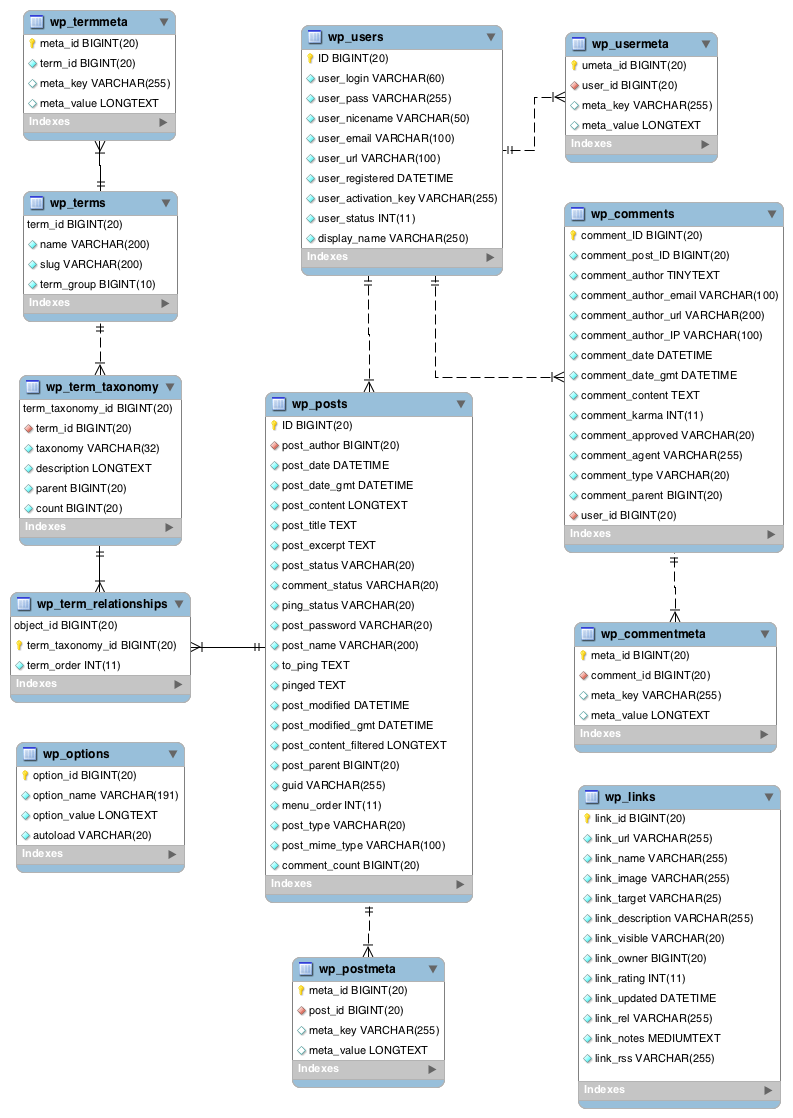
A Little WordPress Database History
WordPress Version 4.2 was released on April 23, 2015. Named "Powell" in honor of jazz pianist Bud Powell, Version 4.2 changed the world of WordPress databases. The release notes say it all:
Database character encoding has changed from utf8 to utf8mb4, which adds support for a whole range of new 4-byte characters.
https://wordpress.org/news/2015/04/powell/
Prior to release 4.2, depending on the default collation was utf8. If you download the latest version of WordPress today, the wp-config-sample still defines DB_CHARSET as 'utf8':
/** Database charset to use in creating database tables. */
define( 'DB_CHARSET', 'utf8' );
/** The database collate type. Don't change this if in doubt. */
define( 'DB_COLLATE', '' );
Even though DB_CHARSET is defined in wp-config as 'utf8', when we created our new pristine environment, the database was built as utf8mb4 and utf8mb4_unicode_520_ci, the defaults established in WordPress 4.2. We learned that WordPress overwrites the wp-config setting with this code from the WPDB class:
If you're not sure what this function does, let us explain. This function in the WPDB class automatically changes the character set from "utf8" to "utf8mb4". If your WordPress database supports utf8mb4_unicode_520_ci collation, then WordPress automatically assigns it as the db collation value, otherwise utf8mb4_unicode_ci is used instead; "utf8" and "utf8_general_ci" are the fallback character set and collation for older databases that don't support "utf8mb4" character sets and collations.
A Little MySQL History
Before WordPress starting using UTF-8 as the default character encoding, early databases deferred character encoding and collation to the MySQL defaults that are latin1 and latin1_swedish_ci.
Modernization Explained
Database character sets and collation are complicated. If you want to learn more in depth about Unicode, please visit the Unicode Consortium site. If you're up for an interesting opportunity, you may even adopt your own Unicode character. There are more than 136,000 characters that can be adopted by you or your organization for as little as $100 USD.
Incorrectly converting a database can lead to data corruption and loss. Before even considering anything else, backup your database so you can easily restore everything if things go awry.
Online documentation for changing the database collation is scant and sketchy at best. As an organization, Victor Font Consulting Group, LLC. knows how to research and we looked everywhere that came to mind no matter how much of a long shot it might have been. We found tons (metaphorically, not literally) of articles and recommendations about WordPress database optimization and learned nothing new that we don't already provide in our Care Plan Subscriptions.
As far as the primary "Illegal mix of collations" error, we found some information on WordPress.org that also had some conversion scripts. The question had been asked on Stack Overflow a few times and none of the answers were correct either. We also found references in several ISP/Host knowledge bases that proved more helpful than not.
Another interesting find is an old WordPress plugin in the repository named Database Collation Fix that sets the database back to utf8 from utf8mb4 if migrating your system to an older MySQL version.
What we could not find was the one resource that confirmed that "utf8mb4" is the WordPress default global character set and utf8mb4_unicide_520_ci should be the default database and field collation until we came across the Version 4.2 release notes.
Every suggested solution we found, even the crowd sourced scripts available from WordPress.org, failed with invalid character errors and the site would not come back up properly.
To further complicate matters, this client's database is so old that when we compared old and new table structures side-by-side, some of the varchar lengths were significantly shorter in the old tables than the current WordPress database schema defaults.
Why the WordPress update process didn't adjust these out of spec field lengths is beyond knowing. Something failed somewhere, but whatever was missed during WordPress updates is irrelevant at this point in the troubleshooting and repair process. With all other approaches failing, the only one that worked and produced the expected results without error is an in situ database reconstruction.
An "in situ database reconstruction" is usually something that is only recommended when all else fails. It is the plan of last resort but may be the only thing that can get the mishmash that an aged WordPress database can grow into fully operational again. It'll breathe new life into a WordPress system because the database will be more performant with large datasets and ensure ongoing consonance until the Unicode Consortium decides to modify the rules again.


 Successful websites continuously attract the right type of visitors and lead them down a path toward becoming a customer. This requires consistent content publishing and monitoring of the website to make sure it is achieving its objectives. It also necessitates routine upkeep to assure that your website operates at peak performance and maximum efficiency.

